
How to replace the handle on a Pella Rolscreen sliding door
These instructions apply to:
1) Removing The Screen Handles
Architect Series® 12/2004 - Current
Designer Series® 3/2005 - Current
Designer Series® 3/2005 - Current
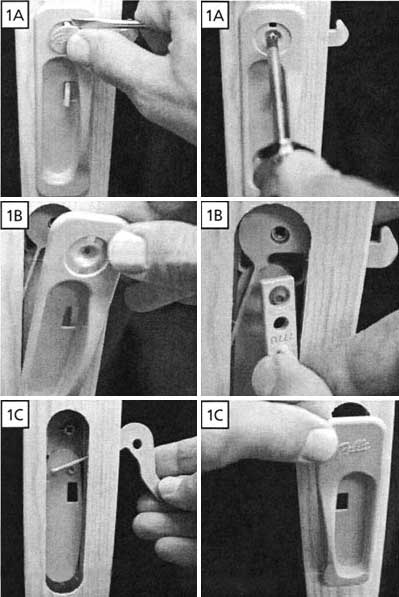
1A) Remove the Pella emblem from the handle using a slotted screwdriver. Using a phillips
screwdriver, remove the screw found underneath the Pella emblem.
1B) Remove the interior handle. Then remove the thumb button.
1C) Remove the lock catch. Then remove the exterior handle.
1B) Remove the interior handle. Then remove the thumb button.
1C) Remove the lock catch. Then remove the exterior handle.
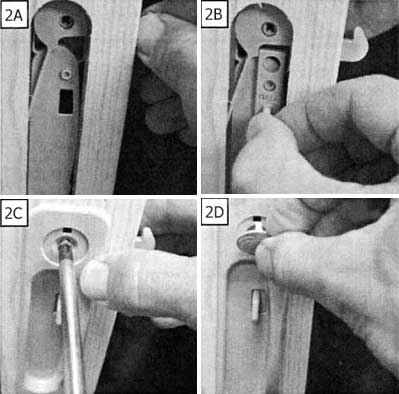
2A) Install the replacement handle in the reverse order. Install the exterior handle first.
2B) Now install the lock catch. Make sure that the hole in the lock catch fits over the screw hole in the exterior handle. Next, install the thumb button making sure the smaller hole in the thumb button part aligns with the tab in the back side of the exterior handle.
2C) Insert the interior handle. Insert and tighten the screw while holding the interior and exterior handles in place.
2D) Install the Pella emblem.
2B) Now install the lock catch. Make sure that the hole in the lock catch fits over the screw hole in the exterior handle. Next, install the thumb button making sure the smaller hole in the thumb button part aligns with the tab in the back side of the exterior handle.
2C) Insert the interior handle. Insert and tighten the screw while holding the interior and exterior handles in place.
2D) Install the Pella emblem.
Related Products

